

Phone System Upgrade
What’s happening?
We’re upgrading our phone system to deliver better voice quality and new features like warm transfers. We’ll be migrating all customers to the new system over the coming weeks.What you’ll notice
- Improved voice quality — smoother, more natural-sounding conversations
- Warm transfers — your assistant can now brief the person receiving a transferred call before or after the connection, so your customers don’t have to repeat themselves. Learn more.
- Intro interruption control — a new setting on the Phone page lets you choose whether callers can interrupt the assistant’s greeting
What to know during the transition
- If your assistant hasn’t been migrated yet, warm transfers and some newer features won’t be available.
- Outbound phone calls via API are not yet available on the new system. If you currently use API-triggered outbound calls, your assistant will remain on the current system until this is rebuilt. Outbound calls through Campaigns are not affected.
If you have questions about the migration or want to check your assistant’s status, reach out to .
Account Update: New Login URL
What changed?
We’ve updated the URL where you access your Replify account to https://app.replify.ai Don’t forget to bookmark this new link!
What this means for you:
• Your AI assistant email (for example:{your-business-name}@mylibby.ai) is not changing• Your account, data, and settings all stay the same
• Your existing chatbot links will continue to work for now
What we recommend updating for chatbot users:
To update your chatbot URL:- Go to
- Customize your new chatbot URL (you can choose your own custom link), and save.
- Update your chatbot implementation:
- For embedded chatbots: Either change the
window.baseUrlin your existing embedded code to the new URL, or copy the full new JavaScript snippet from the chatbot settings page and replace the old code on your website. - For direct links: Copy the new link and update it wherever you’ve shared the old chatbot link (social media bios, website links, email signatures, etc.)
- For embedded chatbots: Either change the
https://myreplify.ai/c/{your-custom-link}
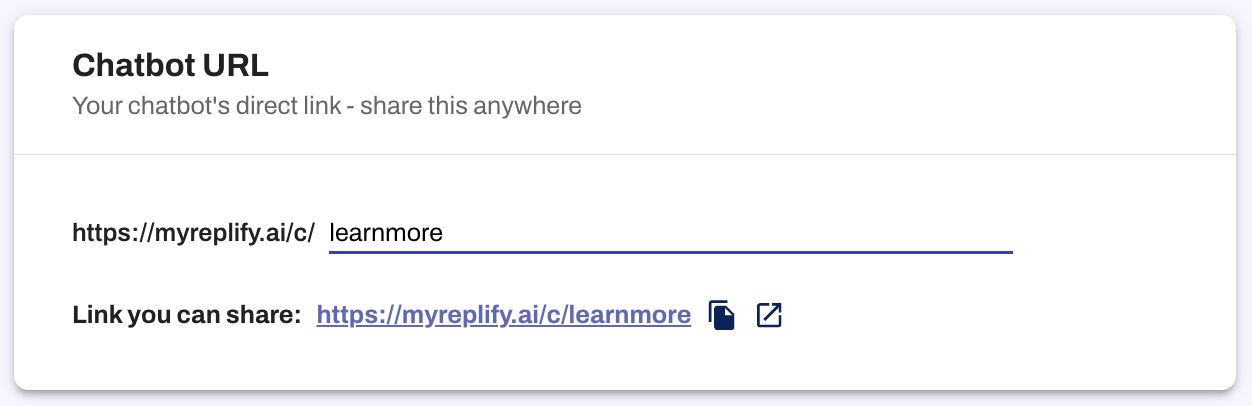
Older heylibby.ai chatbot links will continue to redirect for now, but they’ll eventually be retired. We recommend updating to the new format as soon as possible.